Logging In
Before you can begin managing your domains and records, you'll first need to log into the UltraDNS Management Portal (UI Portal).
The UI Portal can be reached at: https://portal.ultradns.com
New Users
For users that are brand new to the UltraDNS Managed Services Portal, please reach out to Customer Support for your account credentials if you have not already received them. The following are the various methods in which Customer Support can be contacted.
-
+1 844-929-0808
-
+1 540-835-5462
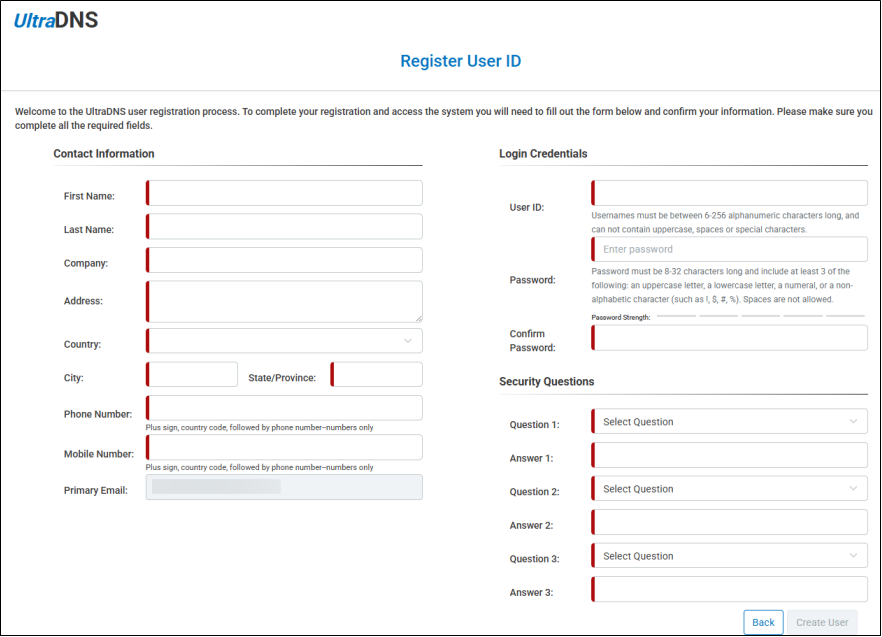
When it comes time to create your account, complete all of the required fields, as displayed in the sample image below.
Please note, that usernames must be all lowercase.
Existing Users
For those users with an existing account, or those who are coming over from the legacy UltraDNS Management Portal, enter your Username and Password, and then click the Login button.
Your account will be locked out if you are unsuccessful logging in with your username and password after multiple attempts. If this occurs, please wait for the indicated period of time before logging in again, or contact our Customer Support team for further assistance.
Forgot Username or Password
If you have forgotten your Username or Password, click on the corresponding link to retrieve your credential type.
To retrieve your Username, you will need to provide the email address that is on file for the account. If you do not know the email address, please contact Customer Support for further assistance.
When creating a new password, please make sure the following parameters are followed.
-
Password must be 8-32 characters long and include at least 3 of the following:
-
an uppercase letter
-
a lowercase letter
-
a numeral, or a non-alphabetic character (such as !, $, #, %)
-
Spaces are not allowed.
-