Snapshot
In UltraDNS, a backup is also known as a Snapshot. A zone snapshot represents the state of a zone (i.e. primarily its RRSet configuration) at the time the Snapshot is created.
Performing a zone Restore uses the most recent zone snapshot, and overwrites the zone's current configuration with that of the one stored in the snapshot. The zone snapshot can be restored at any point in time, as long as the zone meets the required criteria.
Snapshot or Restore are background activities, and as such, it is highly recommended that you refrain from performing any activity that could change the zone configuration while a snapshot or restore is in progress, as doing so might lead to data inconsistency or other unexpected results.
Snapshot Restrictions
-
A zone can have a maximum of 1 snapshot at a time. Performing a snapshot request creates a new snapshot, and will overwrite an existing Snapshot if one exists.
-
Snapshot and Restore only support primary zones.
-
A zone cannot have more than 50,000 records, including the allowed pool's resource records.
-
A zone should not include any of the following:
-
Mail Forwarding records
-
Signed zones
-
Secondary zones
-
Alias zones
-
Suspended zones
-
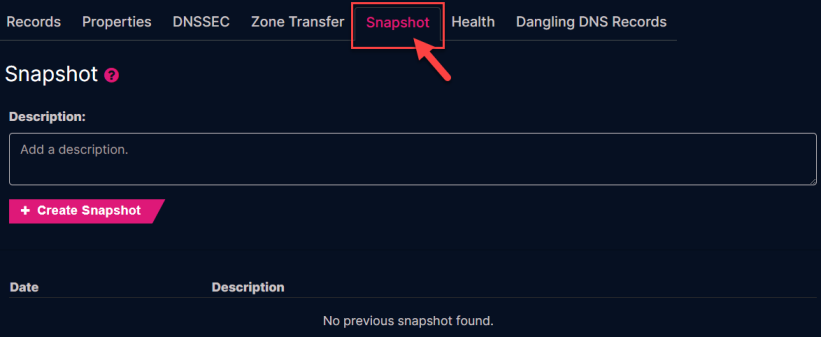
Create a Snapshot:
-
Provide an optional Description for the snapshot, otherwise the date and timestamp will be the only indicator.
-
Click the Create Snapshot button.
-
Once the snapshot completes, you will see an entry with the description (if any), and the date and time the snapshot was created.
Restore a Backup:
-
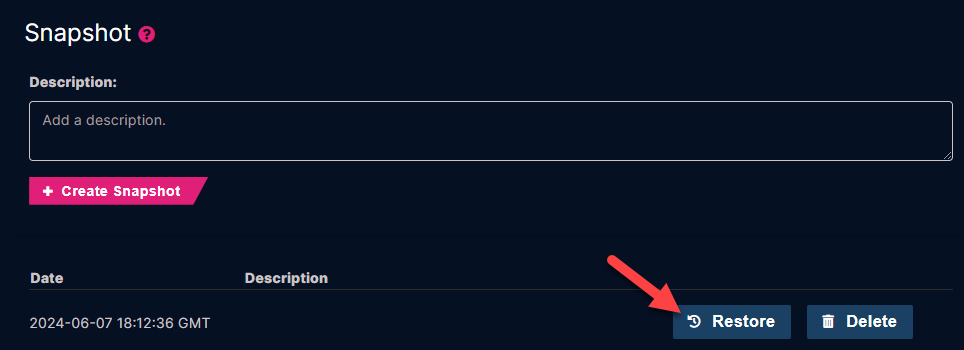
Click the Restore button on an existing snapshot record.
-
Click the Restore button again when the Warning message that states that performing the snapshot action will overwrite your existing zone state upon completion.
-
Once the Restore completes, the zone details will appear.
Delete a Snapshot:
It is recommended that you delete any snapshots that you no longer need.
-
Click the Delete button next to the snapshot that you want to delete.
-
Click the Delete button again to confirm the deletion of the snapshot.